


You already know the pattern. A technician has to fill in ticket fields that never needed to be mandatory in the first place. Getting a clear picture of Microsoft 365 license usage often means checking several different admin tools. And there's still no quick way to pull a colleague into a ticket to flag something directly.
Thanks to 26.3, you decide which fields are actually required on ticket actions, see your Microsoft 365 license assignments in one place, and test three new integrations in Preview: Cisco Meraki, Zendesk, and Splashtop.
Want the full technical rundown?
Check out our user guide for 26.3
1. Ticket forms that show only what's relevant
Not every ticket action needs the same fields, and until now, admins were stuck with a fixed set on every transition, all mandatory, whether or not they actually applied. With 26.3, you choose which fields appear on Go to status, Resolve, and Approve actions, mark some as optional instead of mandatory, and lay them out side by side.
There's a second benefit that matters just as much as the form itself: information doesn't get lost between solvers.
Whatever a technician fills in on one step stays on the ticket for whoever picks it up next, so nothing has to be re-asked or re-discovered. It also means tracing back what happened on a ticket, for a handover or an audit, is a lot faster than digging through the history manually.
For example: a ticket for "reinstall my laptop" moves from In Progress to Resolved. When the technician clicks Resolve, the form shows only what matters for that step:
- cause of the problem (hardware failure, damaged system, user error),
- the solution applied, whether a data backup was made,
- and an internal note for IT that never gets saved as a regular ticket field.
Custom JavaScript: If you need more advanced logic or dependencies between fields, you can extend the form using custom JavaScript.
What it means for you
Whoever picks up a ticket next already has everything the last person entered, nothing to re-ask, nothing to rediscover. And if you ever need to trace back what happened on a ticket, that trail is already built in.
Read more in the full article on Form Editors
2. See who's using what in Microsoft 365
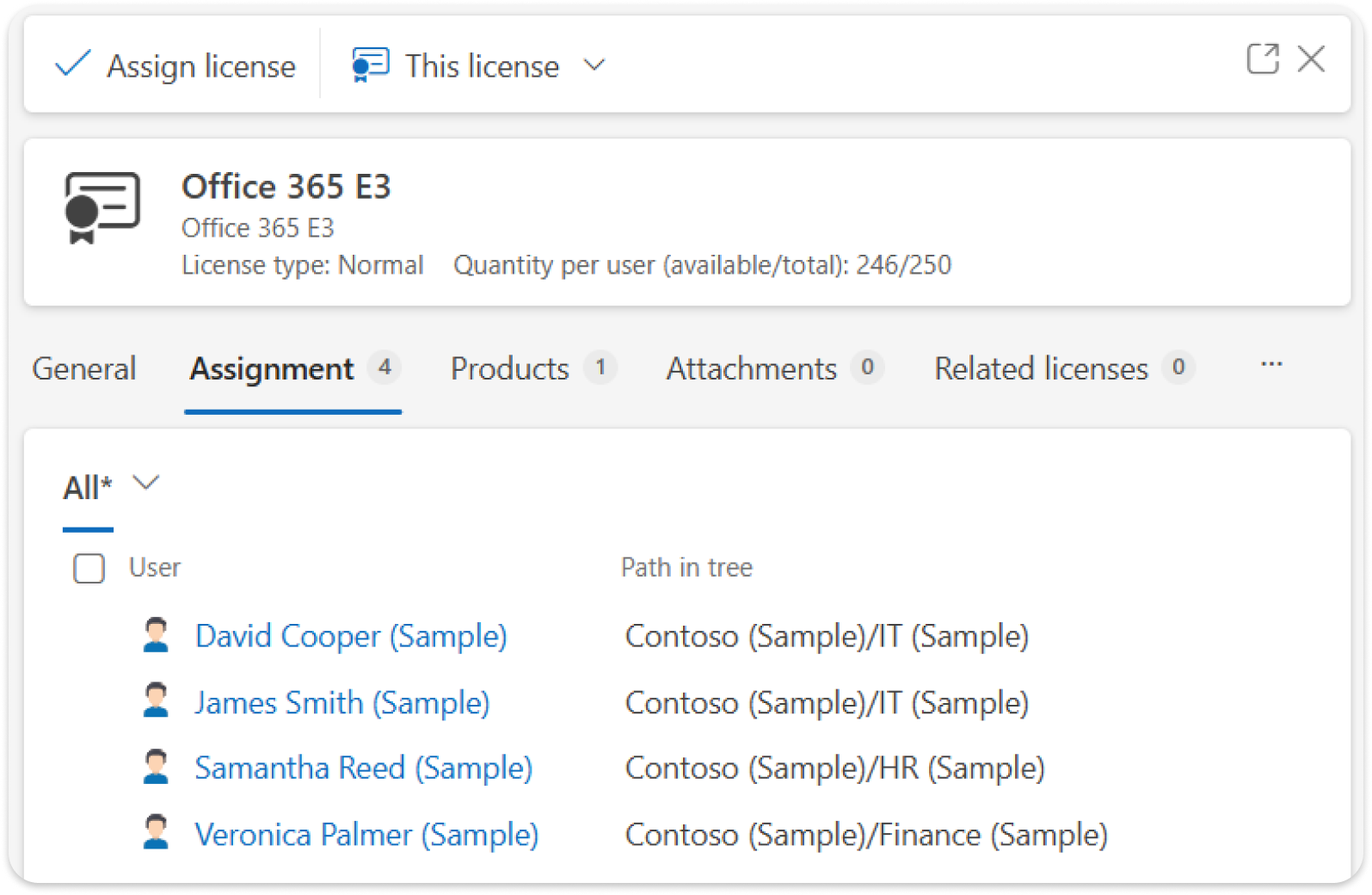
Most IT teams know roughly how many Microsoft 365 licenses they've bought. Far fewer can say, without checking several places, who actually has which license today. ALVAO 26.3 imports your license data straight from Microsoft 365:which licenses exist, and who they're assigned to, all in one place, without manual scripts or exports.
What it means for you
You can see who has which license without opening the Microsoft 365 admin center, and catch an unused or duplicate one yourselves, in minutes.
Read more in the full article on importing Microsoft 365 licenses
3. New integrations and AI, all open for testing
A few new integrations and AI additions are ready to test in Preview. Interested in trying any of them? Request access here: select the features you'd like to test, and a separate request will be created for each one.
Preview features are early versions made available for testing and may have limitations; we'll follow up with a testing plan and next steps.
Cisco Meraki integration (Preview)
If you manage network hardware across more than one location, you know the routine: something drops at a remote site, and someone has to notice before anyone calls.
The new Cisco Meraki integration connects your network devices to ALVAO directly, so they show up in your asset inventory and network events appear in ALVAO instead of only in the Meraki dashboard.
What it means for you
If an access point goes down at a branch office, you'll see it in ALVAO right away, without logging into Meraki separately to check.
Read more in the full article on the Cisco Meraki integration
Link Asset Management objects with Zendesk tickets (Preview)
This Preview brings integration between ALVAO Asset Management and Zendesk tickets, so you don't need a separate lookup to know which device a ticket is about.
What it means for you
Technicians see the device involved right away, and asset managers get the full incident history for that device without switching tools.
Read more in the full article on linking assets with Zendesk tickets
Splashtop integration (Preview)
Starting a remote session shouldn't mean leaving the ticket. With the new Splashtop integration, you can launch remote sessions directly from a ticket or an asset.
What it means for you
The remote session gets recorded on the ticket automatically, so there's a record of who connected to what, and when, without anyone adding a note by hand.
Read more in the full article on the Splashtop integration
AI, still moving forward
Behind the scenes, we keep expanding what AI can do inside ALVAO. Preview access is open for the self-service AI Agent, the Microsoft Copilot connector, and the ALVAO MCP Server. All three are ready to test today using the same request form.
Preview access is now open for three AI additions: a self-service AI Agent for users, a Microsoft Copilot connector for tickets and assets, and the ALVAO MCP Server.
4. Two changes, fewer daily interruptions
Tag users with @ in ticket communication
Anyone creating a ticket can tag colleagues directly in the description using @, to let them know they're needed, for quicker, easier communication. Tagged users get a notification with the full ticket text, so they have full context right away.
What it means for you
Fewer "did you see this" pings, and nobody finds out too late that a ticket needed their attention.
Read more in the full article on tagging users in tickets
Automated Monitor Tracking
Monitors have a habit of quietly disappearing from inventories: moved between desks, swapped, unplugged, and forgotten. ALVAO now discovers and tracks computer monitors automatically from hardware scan data, and links each one to the computer it's connected to. Built-in rules catch duplicates and inconsistencies before they pile up.
What it means for you
One less asset type you have to chase down by hand, and one less gap at your next audit.
Read more in the full article on tracking computer monitors
5. On the way
Sync user mentions from Jira and Azure DevOps into ticket communication.
When someone tags a colleague in a Jira or Azure DevOps comment, the full comment, mention included, will sync automatically into the related ALVAO ticket's history, so nothing gets lost between tools.
Read more in the full article on tagging users
Initial import of organizational structure from Excel to the asset registry.
Instead of building buildings, rooms, and object hierarchy from scratch, you'll be able to bring that structure in from an existing ERP export, Excel, or CSV template.
Your opinion matters to us
Schedule a feedback session with Marketa - Product Analyst or send your insights to the ALVAO Ideas portal.