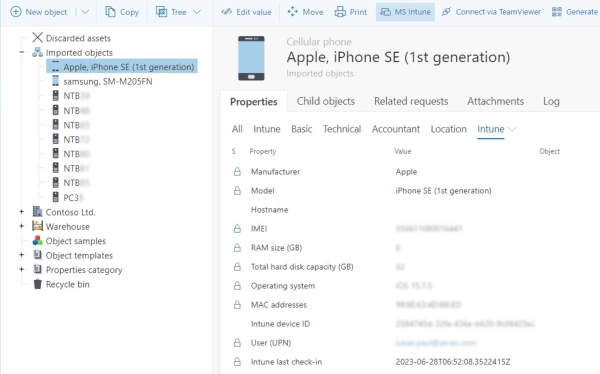
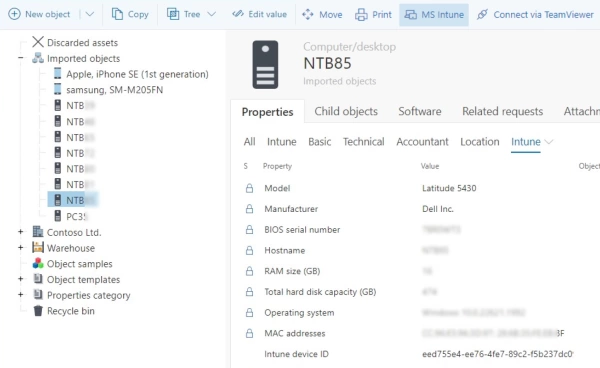
ALVAO Interactive Product Tour. ALVAO's object tree mirrors your organization's structure. Information enters at the top of the object tree through Intune, Entra ID, Jamf, and native network scan. Autopilot sorts users into departments from Entra ID data and assigns devices from Intune. Allocates standard office sets automatically based on rules. Confirmation request sent to user. User receives email asking to confirm asset, which takes them to the employee portal. Employees see assigned equipment. Single click confirms handover. Asset appears in employee portal. User records populate automatically from IAM including Entra ID and Okta. View device's full technical configuration, warranty validity, and inventory number. Top bar triggers actions including remote connection, moving asset, replacement, jumping to Intune, and generating QR code. View all software found on device. Installed software added from native network scan, Intune, and monitoring systems. Checks whether every installation has a licence assigned to device. View recurring issues and repairs by linking service desk tickets. Attachments tab holds acceptance form generated automatically when asset assigned, invoices, and documentation. Log tab records every lifecycle change. View child objects on organization level. Overview of every asset in organization with tailored views including computers, mobile devices, and items with expired warranty. Asset data feeds operational dashboards with real-time insights. Track warranty expiration by manufacturer, type, and date. Click date to get list to renew or replace with owners and locations. View entire software estate including what's installed, which licences are assigned, and which are missing. Object Age dashboard shows tracked items grouped by age in years. See Windows 11 rollout status and devices needing upgrading.